

Key Takeaways
Option A
Mesh Wi-Fi Network
The unified, whole-home coverage solution.
Best for: Larger homes, multi-story layouts, or households where seamless roaming and consistent speeds across every room are a priority.
Option B
Wi-Fi Range Extender
The quick, low-cost signal booster.
Best for: Smaller spaces or targeted dead zones where adding a single device can bridge a coverage gap without replacing existing equipment.
If you have dead zones in a large or multi-story home
Mesh Wi-Fi Network
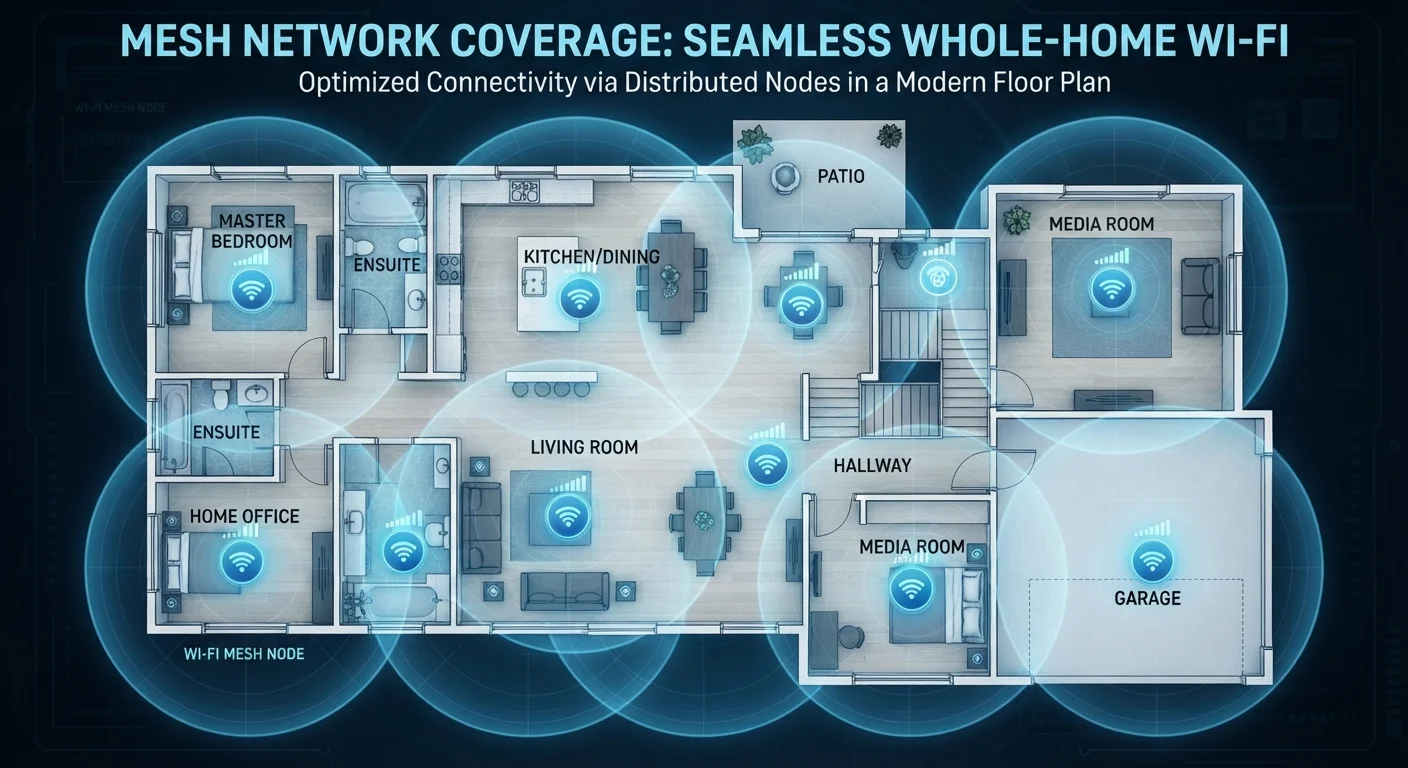
Mesh nodes blanket the entire home with a single, coordinated network. Devices roam seamlessly between nodes without drops or manual switching.
If you need to fix one specific weak-signal room on a budget
Wi-Fi Range Extender
A single extender can be an affordable, quick fix for a targeted dead zone without replacing your entire router setup.
If you work from home and need consistent speeds throughout
Mesh Wi-Fi Network
Mesh systems maintain more stable throughput across nodes, reducing the bandwidth degradation that extenders typically introduce.
If you rent and want a portable, minimal-commitment solution
Wi-Fi Range Extender
Extenders are compact, easy to move, and require no reconfiguration of your landlord's existing router setup.
How Each Technology Actually Works
Understanding the real difference between mesh systems and range extenders starts with how each one handles your signal — not just where it places hardware.
A Wi-Fi range extender (also called a repeater or booster) connects to your existing router's signal and rebroadcasts it. The extended signal typically appears as a separate network name (SSID), so your devices don't automatically hand off between your router and the extender. There's also a significant performance trade-off: when the extender operates on a single radio band, it uses half its capacity to receive data from the router and the other half to send it to your devices. The result is roughly a 50% reduction in available throughput for devices connected through the extender.
A mesh Wi-Fi system replaces your router with a set of coordinating nodes. Each node is a full-featured access point, and they communicate with each other — often over a dedicated wireless backhaul channel or a wired connection — to form one unified network under a single SSID. Your phone, laptop, or smart TV connects to whichever node offers the strongest signal and transitions between them automatically. This seamless roaming is what separates mesh from an extender setup. For more on the underlying roles of routers and access points, see our home networking basics guide.
| Criterion | Mesh Wi-Fi Network | Wi-Fi Range Extender |
|---|---|---|
| Network structure | Single unified SSID across all nodes | Separate SSID from router network |
| Seamless roaming | Automatic, no reconnection needed | Usually requires manual switching |
| Bandwidth impact | Dedicated backhaul minimizes loss | Up to ~50% reduction per hop |
| Setup complexity | Moderate — replaces existing router | Low — plug-in, minimal config |
| Typical upfront cost | Higher (multi-node kit) | Lower (single device) |
| Best home size | Large, multi-story, or complex layouts | Small to medium with one dead zone |
| Centralized management | Yes, via companion app | Limited or none |
Performance, Coverage, and Real-World Trade-Offs
Coverage area is only part of the story. Consistent speed across that coverage is where the two technologies diverge most sharply.
With an extender, every hop away from the router compounds signal loss. A device two rooms from the extender — which is itself two rooms from the router — experiences latency and throughput degradation at each link. Tri-band extenders, which use a third radio as a dedicated relay channel, reduce (but don't eliminate) this penalty. Still, for bandwidth-intensive tasks like video calls or 4K streaming in a far room, performance can be noticeably inconsistent.
Mesh systems are engineered to minimize this layering problem. Dedicated backhaul channels keep node-to-node traffic from competing with client traffic, and intelligent load balancing directs devices to the optimal node dynamically. The trade-off is complexity and cost — a quality mesh kit can represent a meaningful upfront investment compared to a single extender. If dead zones in your home have a structural or interference cause, it's worth understanding those factors first; our article on why Wi-Fi drops in certain rooms explains common culprits like wall materials and channel congestion.
~50%
Typical bandwidth loss through a single-band extender
A range extender that uses one radio band to both receive and retransmit can cut available throughput for connected devices roughly in half.
3–5 nodes
Typical mesh kit coverage for a large home
Most mesh system manufacturers suggest one node per floor or per 1,500 square feet as a general starting point for full-home coverage.
Wired backhaul — running an Ethernet cable between mesh nodes — is the highest-performing configuration and eliminates wireless backhaul limitations entirely. For a broader look at when wired connections outperform wireless, see our comparison of Wi-Fi vs. Ethernet.
Setup, Management, and Who Each Suits
Extenders are generally plug-and-play: position the device midway between your router and the dead zone, connect it to your existing network, and it begins rebroadcasting. The simplicity is appealing, but the separate SSID that many extenders create can require manually switching networks as you move through the home — a friction point that frustrates users in larger spaces.
Mesh systems involve a more involved initial setup — replacing or integrating with your existing router and placing nodes strategically — but most modern mesh platforms use companion apps that guide the process clearly. Once running, management is centralized: firmware updates, parental controls, and guest network configuration all happen in one interface. Speaking of which, if you plan to set up a guest network, our guide on setting up a guest Wi-Fi network walks through the steps that apply to most modern routers and mesh platforms alike.
Wired Backhaul: The Best of Both Worlds
If your home already has Ethernet ports in multiple rooms, you can connect mesh nodes via cable rather than relying on wireless backhaul. This eliminates the bandwidth-sharing problem entirely and delivers near-router-level performance at every node. It's worth checking whether your mesh platform supports wired backhaul before purchasing, as not all do.
If you're evaluating mesh systems and want to decode the spec sheets — Wi-Fi 6, MU-MIMO, tri-band — our explainer on what router specs actually mean breaks down each term in plain language.